blog
How to find different server types in Active Directory with PowerShell
Working as a freelancer is a great thing if you can handle it. Each day, each week something new happens, and a new problem shows up on my doorstep. It also means it's rarely dull at your job and you get to play with new stuff. But there's one drawback to this. You're often thrown at the problem, told to fix it, but usually, that's about as much information as you get. It wasn't very different today. I was told to switch Office 365 from ADFS to Password Synchronization. The critical question here is what **ADConnect **server is responsible for this configuration?
💡 How to find ADConnect
While today it was just AD Connect that I had to find, yesterday it was Microsoft Exchange server. Tomorrow they will most likely ask me to fix SQL so before I tell them I quit I decided that I need some handy PowerShell command that will do my work for me. Of course, some companies name their servers after the role they have so it's quite easy to find them (like my home lab), but sometimes it's not that obvious. So what's the best way to find roles of servers without having a clue about them? Ask your Active Directory! Starting with AD Connect, I've created small function. It's not foolproof, but it works. If you have a habit of touching your AD, changing descriptions, modifying every bit of what AD Connect does when it's set up this will most likely not work.
function Find-ADConnectServer {
    [alias('Find-ADSyncServer')]
    param(

    )
    $Description = Get-ADUser -Filter { Name -like "MSOL*" } -Properties Description | Select-Object Description -ExpandProperty Description

    foreach ($Desc in $Description) {
        $PatternType = "(?
    [CmdletBinding()]
    param(

    )
    $ExchangeServers = Get-ADGroup -Identity "Exchange Servers" | Get-ADGroupMember | Where-Object { $_.objectClass -eq 'computer' }
    foreach ($Server in $ExchangeServers) {
        $Data = Get-ADComputer -Identity $Server.SamAccountName -Properties Name, DNSHostName, OperatingSystem, DistinguishedName, ServicePrincipalName
        [PSCustomObject] @{
            Name              = $Data.Name
            FQDN              = $Data.DNSHostName
            OperatingSystem   = $Data.OperatingSystem
            DistinguishedName = $Data.DistinguishedName
            Enabled           = $Data.Enabled
        }
    }
}
Find-ExchangeServer | Format-Table -Autosize *

Simple, but effective.
💡 How to find Hyper-V Servers
This little function helps to find Hyper-V servers in your Active Directory domain. It doesn't detect Windows 10 Hyper-V (bummer I know) but it seems to work fine on server environments.
function Find-HyperVServer {
    [cmdletbinding()]
    param()
    try {
        $ADObjects = Get-ADObject -Filter 'ObjectClass -eq "serviceConnectionPoint" -and Name -eq "Microsoft Hyper-V"' -ErrorAction Stop
    } catch {
        Write-Error "Error: $_"
    }
    foreach ($Server in $ADObjects) {
        $Temporary = $Server.DistinguishedName.split(",")
        $DistinguishedName = $Temporary[1..$Temporary.Count] -join ","
        $Data = Get-ADComputer -Identity $DistinguishedName -Properties Name, DNSHostName, OperatingSystem, DistinguishedName, ServicePrincipalName
        [PSCustomObject] @{
            Name              = $Data.Name
            FQDN              = $Data.DNSHostName
            OperatingSystem   = $Data.OperatingSystem
            DistinguishedName = $Data.DistinguishedName
            Enabled           = $Data.Enabled
        }
    }
}
Find-HyperVServer | Format-Table -Autosize *
It output similar data as Microsoft Exchange command.
💡 How to find all types of servers - Monster Edition
While working on next set I've thought that I will most likely forget all those command names soon enough and I need to have a reliable way to get my server types from Active Directory. That's why I've decided to prepare this little monster. While it may not be the most optimized code in the world it does, it's the job and returns data pretty quickly giving your full overview of servers.
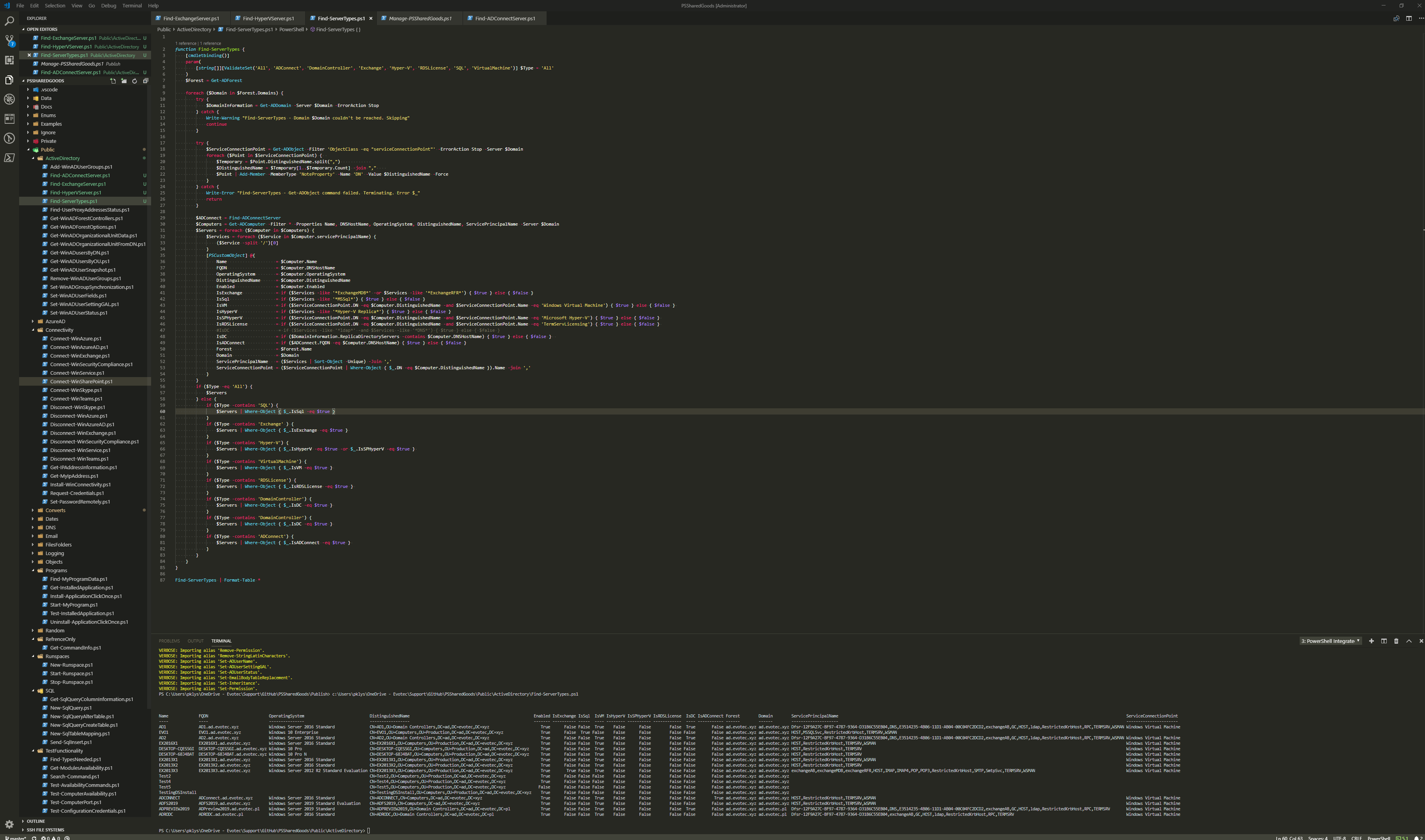
function Find-ADConnectServer {
    [alias('Find-ADSyncServer')]
    param(

    )
    $Description = Get-ADUser -Filter { Name -like "MSOL*" } -Properties Description | Select-Object Description -ExpandProperty Description

    foreach ($Desc in $Description) {
        $PatternType = "(?
    [CmdletBinding()]
    param(
        [switch] $TestAvailability,
        [switch] $SkipEmpty
    )
    $Forest = Get-AdForest
    $Servers = foreach ($D in $Forest.Domains) {
        try {
            $DC = Get-ADDomainController -Server $D -Filter *
            foreach ($S in $DC) {
                [PSCustomObject]@{
                    Domain                   = $D
                    HostName                 = $S.HostName
                    Forest                   = $Forest.RootDomain
                    IPV4Address              = $S.IPV4Address
                    IsGlobalCatalog          = $S.IsGlobalCatalog
                    IsReadOnly               = $S.IsReadOnly
                    SchemaMaster             = ($S.OperationMasterRoles -contains 'SchemaMaster')
                    DomainNamingMasterMaster = ($S.OperationMasterRoles -contains 'DomainNamingMaster')
                    PDCEmulator              = ($S.OperationMasterRoles -contains 'PDCEmulator')
                    RIDMaster                = ($S.OperationMasterRoles -contains 'RIDMaster')
                    InfrastructureMaster     = ($S.OperationMasterRoles -contains 'InfrastructureMaster')
                    Comment                  = ''
                }
            }
        } catch {
            [PSCustomObject]@{
                Domain                   = $D
                HostName                 = ''
                Forest                   = $Forest.RootDomain
                IPV4Address              = ''
                IsGlobalCatalog          = ''
                IsReadOnly               = ''
                SchemaMaster             = $false
                DomainNamingMasterMaster = $false
                PDCEmulator              = $false
                RIDMaster                = $false
                InfrastructureMaster     = $false
                Comment                  = $_.Exception.Message
            }
        }
    }
    if ($TestAvailability) {
        foreach ($Server in $Servers) {
            if ($Server.IPV4Address -ne '') {
                $Output = Test-Connection -Count 1 -Server $Server.IPV4Address -Quiet -ErrorAction SilentlyContinue
                Add-Member -InputObject $Server -MemberType NoteProperty -Name 'Pingable' -Value $Output
            } else {
                Add-Member -InputObject $Server -MemberType NoteProperty -Name 'Pingable' -Value $false
            }
        }
    }
    if ($SkipEmpty) {
        return $Servers | Where-Object { $_.HostName -ne '' }
    }
    return $Servers
}
Get-WinADForestControllers | Format-Table -Autosize *
# Alternatively
Get-WinADDomainControllers

I've also added an option to verify connectivity to DC's quickly. It's a simple ping but sometimes helpful.
Get-WinADForestControllers -TestAvailability | Format-Table -AutoSize *

In my final words, I wanted to add that functions I've created are based on Active Directory and require RSAT to work. They are asking different parts of AD (Service Connection Point, Service Principal Name and so on) to guess server type. It's possible some of that information is out of date, or that guess is incorrect. If you find this useful, please let me know and spread this knowledge. If I made a mistake also let me know so I can fix it and everyone can benefit.