blog
DocX – Password protect Microsoft Word document programmatically
Following code is an example on how to add protection to Microsoft Word document using C# without needing to have Microsoft Word installed.
📋 Prerequisites
Following prerequisites are required to create Microsoft Word document programmatically:
DocX package from **Codeplex **or straight from GitHub sources
- ** Visual Studio 2013** / Visual Studio 2015 (Free Community Edition will do)
- Basic understanding on how to code in C# (C Sharp)
- Basic tutorial on how to start coding with DocX package can be found on our blog post DocX – A short tutorial for beginners HelloWorld()
💻 Example code
Following code provides basic example usage
static void HelloWorldProtectedDocument()
{
    Console.WriteLine("\tHelloWorldPasswordProtected()");

    // Create a new document.
    using (DocX document = DocX.Create(@"docs\HelloWorldPasswordProtected.docx"))
    {
        // Insert a Paragraph into this document.
        Paragraph p = document.InsertParagraph();

        // Append some text and add formatting.
        p.Append("Hello World!^011Hello World!")
        .Font(new FontFamily("Times New Roman"))
        .FontSize(32)
        .Color(Color.Blue)
        .Bold();

        // Save this document to disk with different options
        // Protected with password for Read Only
        EditRestrictions erReadOnly = EditRestrictions.readOnly;
        document.AddProtection(erReadOnly, "SomePassword");
        document.SaveAs(@"docs\\HelloWorldPasswordProtectedReadOnly.docx");
        Console.WriteLine("\tCreated: docs\\HelloWorldPasswordProtectedReadOnly.docx\n");

        // Protected with password for Comments
        EditRestrictions erComments = EditRestrictions.comments;
        document.AddProtection(erComments, "SomePassword");
        document.SaveAs(@"docs\\HelloWorldPasswordProtectedCommentsOnly.docx");
        Console.WriteLine("\tCreated: docs\\HelloWorldPasswordProtectedCommentsOnly.docx\n");

        // Protected with password for Forms
        EditRestrictions erForms = EditRestrictions.forms;
        document.AddProtection(erForms, "SomePassword");
        document.SaveAs(@"docs\\HelloWorldPasswordProtectedFormsOnly.docx");
        Console.WriteLine("\tCreated: docs\\HelloWorldPasswordProtectedFormsOnly.docx\n");

        // Protected with password for Tracked Changes
        EditRestrictions erTrackedChanges = EditRestrictions.trackedChanges;
        document.AddProtection(erTrackedChanges, "SomePassword");
        document.SaveAs(@"docs\\HelloWorldPasswordProtectedTrackedChangesOnly.docx");
        Console.WriteLine("\tCreated: docs\\HelloWorldPasswordProtectedTrackedChangesOnly.docx\n");

        // But it's also possible to add restrictions without protecting it with password.

        // Protected with password for Read Only
        document.AddProtection(erReadOnly);
        document.SaveAs(@"docs\\HelloWorldWithoutPasswordReadOnly.docx");
        Console.WriteLine("\tCreated: docs\\HelloWorldWithoutPasswordReadOnly.docx\n");

        // Protected with password for Comments
        document.AddProtection(erComments);
        document.SaveAs(@"docs\\HelloWorldWithoutPasswordCommentsOnly.docx");
        Console.WriteLine("\tCreated: docs\\HelloWorldWithoutPasswordCommentsOnly.docx\n");

        // Protected with password for Forms
        document.AddProtection(erForms);
        document.SaveAs(@"docs\\HelloWorldWithoutPasswordFormsOnly.docx");
        Console.WriteLine("\tCreated: docs\\HelloWorldWithoutPasswordFormsOnly.docx\n");

        // Protected with password for Tracked Changes
        document.AddProtection(erTrackedChanges);
        document.SaveAs(@"docs\\HelloWorldWithoutPasswordTrackedChangesOnly.docx");
        Console.WriteLine("\tCreated: docs\\HelloWorldWithoutPasswordTrackedChangesOnly.docx\n");

    }
}
📄 Example Output
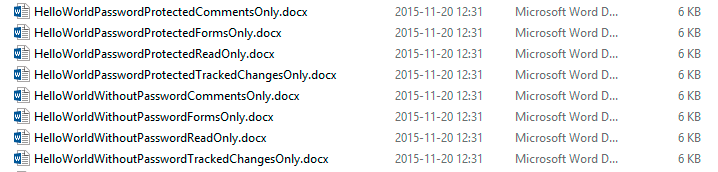
After running above code 8 files should be created with multiple options
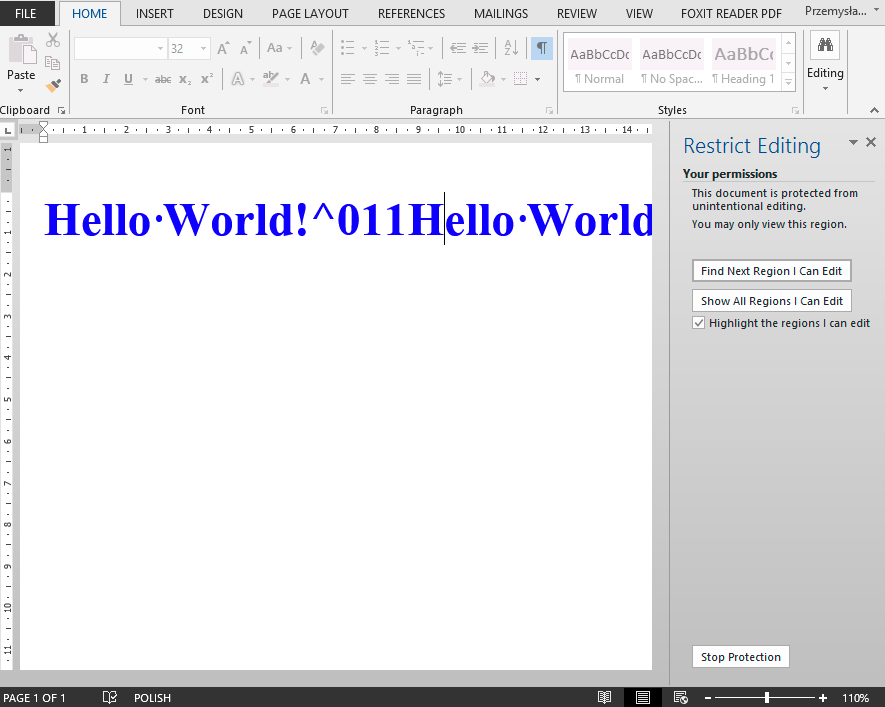
After opening Microsoft Word .docx document and trying to edit it (HelloWorldWithPasswordReadOnly.docx) following Restrict Editing option shows up requiring user to stop protection before being able to continue.